Graphic Design Course Syllabus Explained: What You’ll Learn from Beginner to Professional Level (2026 Guide)
Graphic Design is one of the most sought-after creative skills in today’s digital world. Businesses, startups, advertising agencies, IT companies, and digital marketing firms rely on professional designers to create compelling visual content that builds brands and communicates ideas effectively.
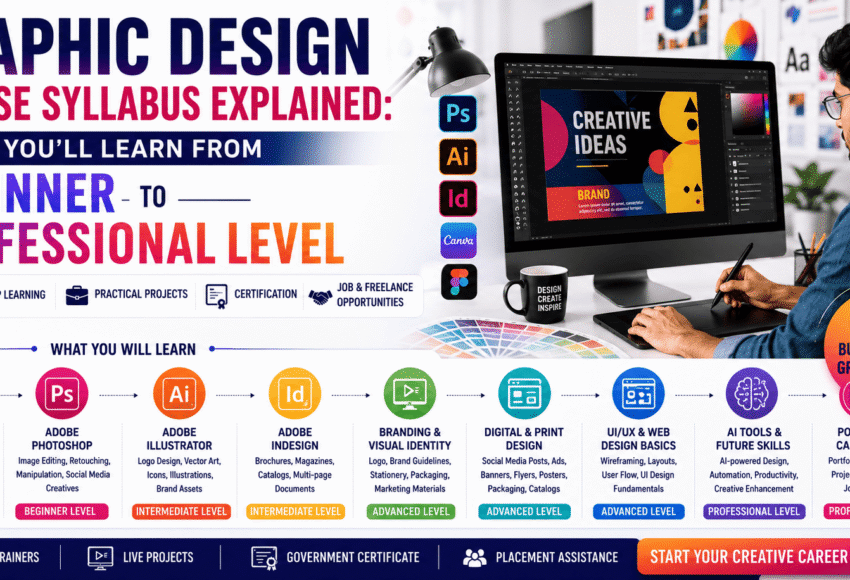
If you’re planning to enrol in a Graphic Design Course, understanding the syllabus is essential before making a decision. A well-structured curriculum should take you from basic design principles to advanced branding, digital design, portfolio development, and real-world projects.
This comprehensive guide explains every stage of a modern Graphic Design course—from beginner to professional level—covering design fundamentals, software training, live projects, AI-assisted creative tools, career opportunities, and the skills employers expect in 2026.
Why Understanding the Graphic Design Syllabus Matters
Choosing the right Graphic Design course is about more than learning software. A professional curriculum helps you build creativity, technical expertise, and problem-solving skills that employers value.
A comprehensive syllabus should help you:
- Build a strong creative foundation
- Master industry-standard design software
- Understand branding and visual communication
- Create print and digital marketing materials
- Develop a professional portfolio
- Work on live projects
- Prepare for freelancing and employment
Who Should Join a Graphic Design Course?
Graphic Design is suitable for learners from diverse backgrounds, including:
- Students after 10th
- Students after 12th
- College students
- Graduates
- Working professionals
- Freelancers
- Entrepreneurs
- Digital marketers
- Social media managers
- Creative enthusiasts
No prior design experience is generally required.
Beginner Level: Design Fundamentals
The first stage focuses on building a solid understanding of design principles.
Topics Covered
- Introduction to Graphic Design
- Elements of Design
- Principles of Design
- Colour Theory
- Typography
- Composition
- Layout Design
- Visual Hierarchy
- Balance and Contrast
- White Space
- Design Psychology
Skills You’ll Develop
- Creative thinking
- Visual communication
- Design observation
- Basic layout planning
- Understanding design aesthetics
These concepts form the foundation for all future design work.
Intermediate Level: Software Training
Once the basics are clear, students learn industry-standard software used by professional designers.
Adobe Photoshop
Topics Covered
- Workspace Overview
- Image Editing
- Photo Retouching
- Background Removal
- Layer Management
- Filters and Effects
- Colour Correction
- Social Media Creatives
- Poster Design
- Advertisement Design
- Photo Manipulation
Projects
- Social media posts
- Event posters
- Marketing banners
- Product advertisements
Adobe Illustrator
Topics Covered
- Vector Graphics
- Logo Design
- Icon Creation
- Illustration Techniques
- Shape Builder
- Pen Tool
- Typography Design
- Infographics
- Packaging Graphics
Projects
- Brand logos
- Icon sets
- Business stationery
- Packaging concepts
Adobe InDesign
Topics Covered
- Print Layout Design
- Brochures
- Magazines
- Books
- Product Catalogues
- Corporate Reports
- Multi-page Documents
Projects
- Company profiles
- Marketing brochures
- Product catalogues
- Magazine layouts
Canva & Adobe Express
Students also learn quick content creation for:
- Social media
- Presentations
- Business promotions
- Marketing campaigns
- Personal branding
Advanced Level: Branding & Marketing Design
At this stage, students move beyond software and focus on strategic design.
Topics Covered
- Brand Identity
- Logo Systems
- Corporate Branding
- Packaging Design
- Marketing Campaign Design
- Print Advertising
- Outdoor Advertising
- Visual Storytelling
Projects
- Brand identity package
- Product packaging
- Marketing campaign creatives
- Promotional materials
Digital Design Module
Modern Graphic Designers create content for digital platforms.
Students learn to design:
- Instagram Posts
- Facebook Advertisements
- LinkedIn Graphics
- YouTube Thumbnails
- Display Ads
- Email Marketing Graphics
- Website Banners
Typography & Colour Mastery
Typography plays a vital role in communication.
Students learn:
- Font Selection
- Font Pairing
- Readability
- Text Hierarchy
- Colour Psychology
- Colour Harmony
- Brand Colour Systems
These skills help designers create visually appealing and effective designs.
Print Design
Graphic Design extends beyond digital media.
Projects include:
- Brochures
- Flyers
- Posters
- Catalogues
- Business Cards
- Letterheads
- Product Packaging
- Corporate Stationery
Students learn print specifications, resolution, colour modes, and file preparation for professional printing.
Portfolio Development
A strong portfolio is one of the most important outcomes of the course.
Students create professional projects such as:
- Brand Identity
- Logo Design
- Packaging Design
- Social Media Campaigns
- Corporate Profiles
- Brochures
- Advertising Campaigns
- Product Promotions
A quality portfolio demonstrates creativity, technical ability, and problem-solving skills.
Live Projects
Many institutes include practical assignments that simulate real client requirements.
Examples include:
- Restaurant Branding
- Fashion Brand Campaigns
- Educational Institute Promotions
- Product Packaging
- Startup Identity Design
- Corporate Marketing Materials
Live projects help students understand industry workflows and client expectations.
AI-Assisted Design Tools
Modern Graphic Design courses increasingly introduce AI-powered creative tools.
Applications include:
- Image enhancement
- Background removal
- Layout suggestions
- Creative ideation
- Productivity improvement
- Content assistance
AI complements the designer’s creativity rather than replacing it.
Professional Skills You’ll Learn
A career-oriented Graphic Design course also develops:
- Client Communication
- Presentation Skills
- Time Management
- Creative Thinking
- Team Collaboration
- Design Thinking
- Project Management
- Freelancing Basics
These skills are valuable in agency, corporate, and freelance environments.
Software Included in a Professional Graphic Design Course
Most professional institutes teach:
- Adobe Photoshop
- Adobe Illustrator
- Adobe InDesign
- Canva
- Adobe Express
- Figma (Basic)
- AI-assisted creative tools
Course Duration
| Programme | Duration |
|---|---|
| Certificate Course | 2–3 Months |
| Professional Course | 4–6 Months |
| Advanced Diploma | 6–12 Months |
Many institutes also offer weekday, weekend, and fast-track batches.
Certification
Most reputed institutes provide:
- Course Completion Certificate
- Professional Diploma (where applicable)
- Industry-recognised certification (depending on the institute)
A recognised certificate adds value to your resume, while employers primarily evaluate practical skills and portfolio quality.
Internship & Placement Support
Career-focused institutes often provide:
- Resume Building
- Portfolio Reviews
- Mock Interviews
- Career Counselling
- Internship Referrals
- Employer Connections
- Interview Preparation
Placement assistance improves employability, although hiring depends on your skills, portfolio, and interview performance.
Career Opportunities
After completing a Graphic Design course, you can pursue roles such as:
- Graphic Designer
- Visual Designer
- Brand Designer
- Creative Designer
- Packaging Designer
- Print Designer
- Marketing Designer
- Social Media Designer
- Advertising Designer
- Junior UI Designer (with additional UI/UX skills)
Many professionals also establish successful freelance careers or creative agencies.
Salary Expectations
Approximate salary ranges in India:
| Experience | Average Salary |
|---|---|
| Fresher | ₹2.5–₹4.5 LPA |
| 2–5 Years | ₹4–₹8 LPA |
| Senior Designer | ₹8–₹15+ LPA |
Experienced freelancers and designers working with international clients may earn considerably more.
How to Choose the Right Graphic Design Course
Before enrolling, ensure the institute offers:
- Updated curriculum
- Experienced trainers
- Practical assignments
- Industry-standard software
- Live projects
- Portfolio development
- Internship opportunities
- Placement assistance
- Flexible batch timings
- Modern computer labs
- Career guidance
A practical, project-based programme is often the best choice for long-term career success.
Why Practical Learning is Essential
Graphic Design is a skill-driven profession. Practical experience helps students:
- Build confidence
- Improve creativity
- Understand client requirements
- Develop problem-solving abilities
- Create professional portfolios
- Become job-ready
Employers consistently value demonstrated skills over theoretical knowledge alone.
Frequently Asked Questions (FAQs)
1. What does a Graphic Design course syllabus include?
A comprehensive syllabus generally covers design fundamentals, Adobe Photoshop, Illustrator, InDesign, branding, typography, print and digital design, portfolio development, live projects, and AI-assisted creative tools.
2. Is thecourse suitable for beginners?
Yes. Most Graphic Design courses are designed for beginners and require no prior experience.
3. Which software will I learn?
Students commonly learn Adobe Photoshop, Illustrator, InDesign, Canva, Adobe Express, Figma (basic), and AI-powered creative tools.
4. Will I work on live projects?
Many institutes include real-world projects that help students build practical skills and create professional portfolios.
5. Is a portfolio important?
Yes. A strong portfolio is often one of the most important factors employers consider when hiring graphic designers.
6. How long does a Graphic Design course take?
Depending on the programme, courses typically range from 2 months to 12 months.
7. Can I freelance after completing the course?
Yes. Graphic Design offers excellent freelancing opportunities with startups, agencies, local businesses, and international clients.
8. Do I need drawing skills?
No. Creativity, design thinking, and software proficiency are more important than traditional drawing skills.
9. Does learning AI replace Graphic Design skills?
No. AI enhances productivity, but creativity, branding expertise, and strategic design thinking remain essential human skills.
10. What should I look for before joining a Graphic Design course?
Choose a programme that emphasises practical training, live projects, portfolio development, experienced faculty, updated software, and career support.
Conclusion
A Graphic Design Course is much more than learning design software—it is a structured journey that develops creativity, technical expertise, strategic thinking, and professional confidence. From mastering design fundamentals and Adobe Creative Cloud applications to working on branding projects, digital campaigns, and portfolio development, each stage prepares students for real-world creative challenges.
Whether you’re a student exploring creative careers, a graduate seeking industry-relevant skills, or a professional looking to upskill, a well-designed Graphic Design curriculum can open opportunities in branding, advertising, digital marketing, publishing, IT, and freelancing. By choosing a course that prioritises hands-on learning, live projects, and career support, you’ll be well-equipped to succeed as a modern graphic designer in 2026 and beyond.